CV Builder · 100% in your browser

Your CV,
ready in a few minutes.

No registration, no installation, no surprises. You build your CV like building blocks — drag sections, pick a style, and export the finished document to PDF or Word. Everything happens right in your browser.

No registration Your data stays with you 6 interface languages
Anna Kowalski
UX/UI Designer
Experience
Senior Product Designer
Creative Studio · 2021–present
Figma UX Research Prototyping
Skills
CV Language
Color theme
13
content block types
8
color themes
6
interface and CV languages
$0
cost, always
Editing

Build your CV from blocks, not a template

Drag a section onto the workspace, fill it with your data, and rearrange it however you like. Every block has its own editor — no more fighting with formatting in Word.

Experience

Position, company, employment period, description and skill tags.

Education

Degree, field of study, institution, study period and extra details.

About me

A short professional summary at the top of the document.

Skills

A list of competencies with proficiency shown as a bar.

Languages

Language proficiency with CEFR levels from A1 to C2, plus native.

Certificates

Name, issuing organization, year and a short description.

Achievements

Concrete results and successes as concise bullet points.

Projects

Name, description, a link to the repository or portfolio, and tags.

Links / Social

LinkedIn, GitHub, portfolio — with its own icon for every link.

Custom text

Your own section with a title and free-form text.

Signature

A hand-drawn signature made with your mouse or uploaded as an image.

Separator

A visual gap between sections, if you want a bit more order.

Editor: blocks panel → workspace → properties panel
Multilingual

One CV, six language versions

Applying for a job abroad? Switch your CV to another language with a single click — section headers and labels translate automatically, while your data stays untouched.

  • Interface: Polish, English, German, Spanish, Ukrainian, Russian
  • The CV content language is independent of the interface language
  • Language proficiency levels on the CEFR scale (A1–C2 + native)
  • Section labels are translated automatically
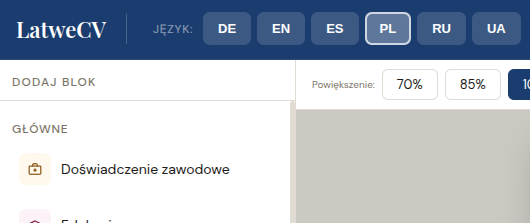
Language switcher
Language switcher: PL · EN · DE · ES · UA · RU
Appearance

8 themes, 4 layouts — change everything in one click

Color, page layout, heading typeface — every element adapts instantly. The preview updates live, so you see the result before you export.

Navy
Gray
Emerald
Wine
Plum
Teal
Rust
Forest

Classic

Sidebar + main content

Minimal

Single column, full width

Bold

Full-width header bar

Right side

Sidebar on the right side

Personalization

Photo, signature, and your style

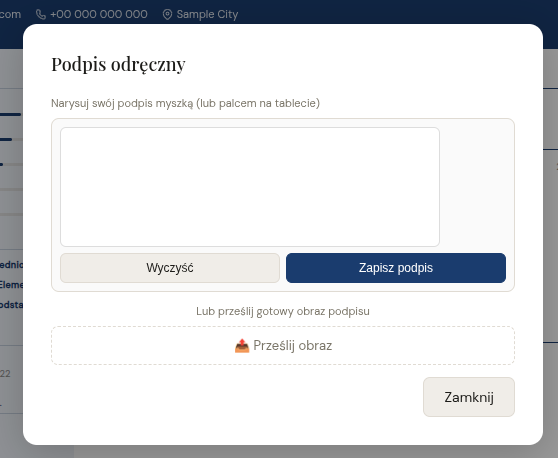
Add a profile photo, draw your signature with the mouse or your finger on a touchscreen — or upload a scan of it. Everything shows up in the live preview.

  • Profile photo with a live preview
  • A signature drawn by hand right in the browser
  • Option to upload a scanned signature as an image
  • Everything is saved automatically as you work
Signature module
Signature module: draw, save, use in your CV
Export

A finished document in a second

Download your CV in whichever format suits you. Your chosen theme, layout and fonts are preserved in every file.

PDF export

A4 format, high quality, ready to send.

Word export

A .docx file that opens in Word and Google Docs.

Printing

Print directly or save as PDF straight from the print dialog.

{ }

JSON copy

Export and import all your data as a backup file.

Process

From a blank page to a finished CV

01

Add blocks

Drag the sections you need onto the workspace — from experience to projects.

02

Fill in and adjust the look

Enter your details, then pick a color theme, page layout and heading font.

03

Download your CV

Export to PDF or Word — or save a JSON copy of your data for later.

Your data never leaves your browser

LatweCV runs entirely locally. No account, no server, no data uploads — everything you type stays saved on your device. The PDF file is also generated on your end, not in the cloud.

100% local
no account
no server
Questions

Frequently asked questions

Yes, entirely. Editing, preview, PDF and Word export, all themes and layouts — available with no charge and no account. There are no hidden limits.

No. Your data is saved automatically in the browser on your device. You can also export it as a JSON file and load it again on another computer.

You can switch the CV content (section headers, labels, language levels) between six languages independently of the editor's interface language — your data stays untouched.

Yes — the color theme, page layout, font and section order can be changed at any time. The preview updates instantly.

As a PDF (A4, ready to send), Word (.docx, editable in Word and Google Docs), or via direct printing from the browser.


Didn't find your answer? Click here

Your CV is waiting for its first word.

Open the editor, add the first block, and in a few minutes you'll have a finished document. No registration, no time limit.

Open LatweCV